Integration Details
This section explains the backend integrations supported for the open banking flows.
| Property | Supported Values |
|---|---|
| PSD2_BACKEND | STUB / T24/ Saltedge |
STUB: When the value is set as STUB, the entire integration touchpoint is mocked, and no real time integration involved.
T24: When the value is set as T24, the integration touchpoint is interfaced with the Transact application.
Salt edge: When the value is set as Salt edge, the integration touchpoint is interfaced with the Transact application and Salt edge gateway provider.
Transact Integration Details
In Transact core banking system, the PZ.PARAMETER will assist in the account information sharing (AIS) and funds check flow (CBPII).
PZ.PARAMETER identifies the type of payment accounts (eligible for open banking) based on the specific category codes or product lines while performing an eligibility check on the open banking flow. After Temenos Digital authentication, perform an account eligibility check before listing for user review consent approval. This check is applicable to the AIS Global consent flow. For more information, see Account Information.
Payment Initiation (PIS)
In Transact core banking system, the PX.PARAMETER will assist with the payment initiation flow.
PX.PARAMETER identifies the type of payment accounts (eligible for open banking) based on the specific category codes or product lines while performing an eligibility check on the open banking flow. After Temenos Digital authentication, perform an account eligibility check before listing for user review payment approval.
Payment Resource Table Update
The third-party application can request payment status at any open banking payment life cycle stage. Payment status is captured in the PX.PYT.RESOURCE in Transact to expose the status of payment to the third-party application. For more information, see Payment Initiation.
From Temenos Digital, update the resource table for the following scenarios:
For Transact integration (Via sample app):
- ACCP – On successful login of the user to the Temenos Digital application.
- PATC – Payment initiated from TPP is sent for additional approval.
- CANC – When the user initiates the rejection of the payment in the open banking flow.
For Salt edge and Transact integration:
- ACSP – On successful approval of the payment by the user in the Temenos Digital application.
- PATC – Payment initiated from TPP is sent for additional approval.
For Bulk payments (Salt edge and Transact integration)
- ACCP- On successful login of the user to the Temenos Digital application.
- ACSP – On successful approval of the payment by the user in the Temenos Digital application.
- PATC – Payment initiated from TPP is sent for additional approvals.
- CANC – When the user initiates the rejection of the bulk payment.
Universal Links
Universal Links (iOS) and App Links (Android) are standard web URLs that can open a specific app or website content, depending on whether the app is installed, providing a seamless user experience.
Universal links (iOS)
A deep linking protocol introduced by Apple in iOS 9 and above allows apps to associate with web URLs, enabling users to transition between web and app content.
App links (Android)
Android's equivalent of Universal Links, allowing apps to handle web URLs and provide a cohesive user experience across platforms.
When a user clicks a Universal Link or App Link, the operating system checks if the application is registered for that domain.
- If the app is installed: The link opens the app and navigates to the specific content.
- If the app is not installed: The link opens in the user's default web browser and navigate to the corresponding website.
This allows developers to use a single link that handles both app and web experiences, providing a more user experience.
Benefits
The following are the benefits of Universal Links (iOS) and App Links (Android).
- Improved User Experience: Users can transition between web and app content, regardless of whether the app is installed.
- Simplified Development: Developers can use a single link for both app and web experiences, reducing complexity.
- Enhanced Security: Universal Links and App Links are designed to be secure and reliable.
Implementation in IOS
To implement the universal links in iOS, do the following:
- Create an apple-app-site-association file.
- PM7352S8QE-Team ID(found in mobileprovision file)
- com.kony.dbxdevapp : Bundle Identifier
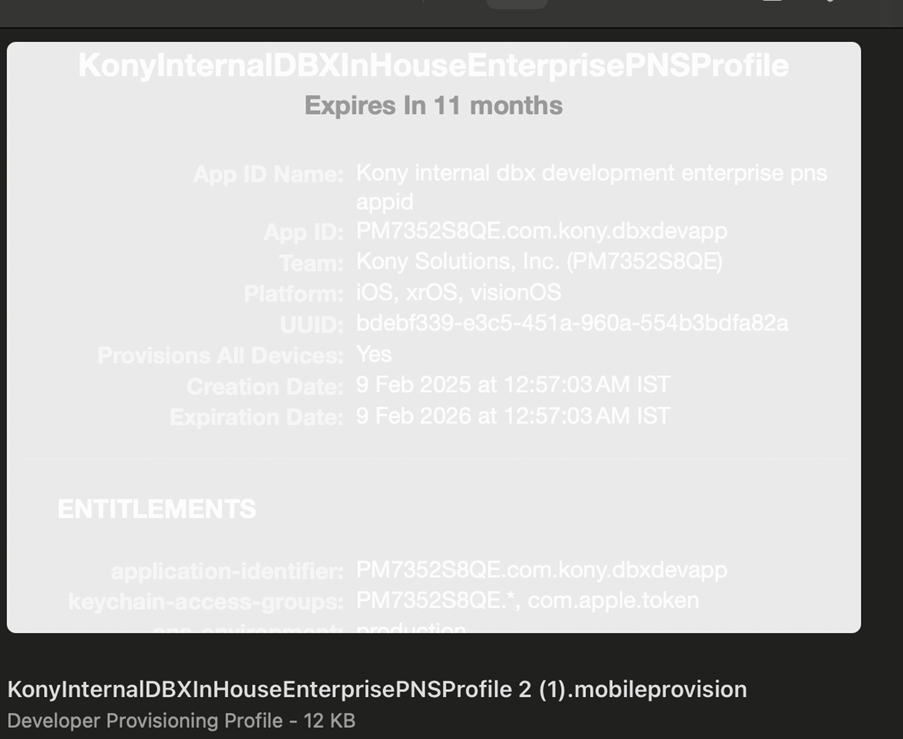
- Check bundle Identifier and URL Scheme is same.
- Deploy the AASA file in.well-known directory.
- In AWS, add as a load balancer rule .
- https://domainname/.well-known/ apple-app-site-association
- For onprem server, create a web project in on prem server and keep the file in following structure.
- For web app, export the file as a war and deploy it in tomcat folder as root.
- Add applinks in associated domain.
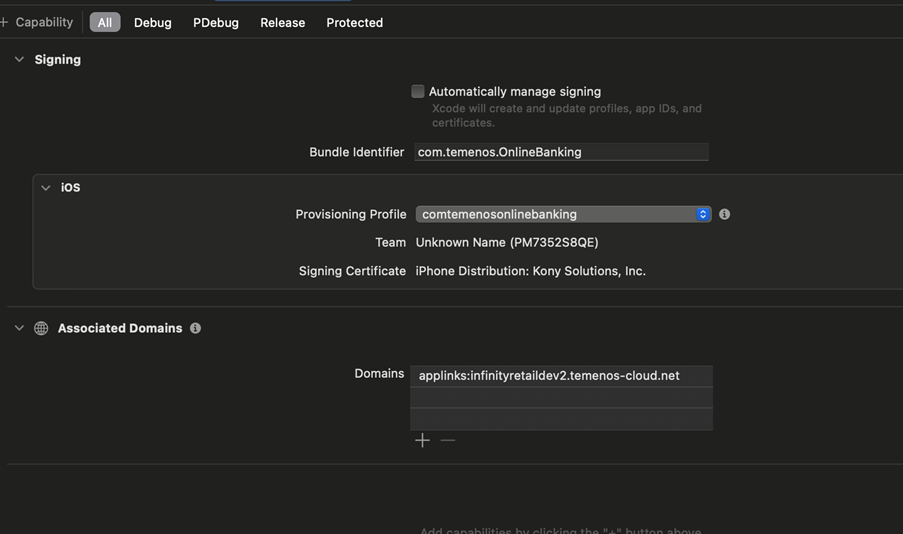
:{
  "applinks": {
    "apps": [],
    "details": [
      {
        "appIDs": ["PM7352S8QE.com.kony.dbxdevapp"],
        "components": [
          {
            "/": "/apps/*"
          }
        ]
      }
    ]
  }
}PM7352S8QE-Team ID(found in mobileprovision file)
src/
├── main/
│   ├── java/
│   │   └── com/example/AppleAppSiteAssociationServlet.java
│   └── webapp/
│       ├── .well-known/
│       │   └── apple-app-site-association
│       └── WEB-INF/
│           └── web.xml


<?xml version="1.0" encoding="UTF-8"?>
<web-app xmlns="http://xmlns.jcp.org/xml/ns/javaee"
          version="3.1">

    <display-name>Apple App Site Association</display-name>

    <!-- Serve AASA file as application/json -->
    <servlet>
        <servlet-name>AASAFileServlet</servlet-name>
        <jsp-file>/.well-known/apple-app-site-association</jsp-file>
    </servlet>

    <servlet-mapping>
        <servlet-name>AASAFileServlet</servlet-name>
        <url-pattern>/.well-known/apple-app-site-association</url-pattern>
    </servlet-mapping>

    <!-- MIME type for json -->
    <mime-mapping>
        <extension>json</extension>
        <mime-type>application/json</mime-type>
    </mime-mapping>

    <!-- MIME type for no extension-->
    <mime-mapping>
        <extension> </extension>
        <mime-type>application/json</mime-type>
    </mime-mapping>


</web-app>
Implementation in Andriod
To implement the universal links in android, do the following:
- Create a assetlinks.json file.
For Example, - To create a sha256_cert_fingerprints, run the following command. User can see SHA256 _cert_fingerprint.
- Deploy the assetlinks.json file in the same fashion as AASA file.
- Add the following intent tags in visualizer settings.
[{
  "relation": ["delegate_permission/common.handle_all_urls"],
  "target" : { "namespace": "android_app", "package_name": "com.temenos.OnlineBanking",
               "sha256_cert_fingerprints": ["07:C9:53:55:9A:71:55:99:A9:C7:D5:0A:78:19:AC:A3:A7:21:9C:2A:3B:1F:7C:04:46:70:FD:7A:17:41:6E:7C"] }
}]
keytool -list -v -keystore path/to/my-release-key.jks
<intent-filter android:autoVerify="true"> <action
 android:name="android.intent.action.VIEW"/> <category
 android:name="android.intent.category.DEFAULT"/> <category
 android:name="android.intent.category.BROWSABLE"/> <data
android:scheme="https" android:host="infinityretaildev2.temenos-cloud.net"
android:pathPattern="/apps/.*"/> </intent-filter>
In this topic